
Every risk sits with a contract, not in a spreadsheet
Record what could go wrong on the agreement it comes from. With impact, likelihood, owner and deadline, so someone is on the hook before things go wrong.
Risks usually live somewhere other than the contract
In most organisations the risk register is a separate file, maintained by one person, disconnected from the agreements themselves. Nobody renewing a contract knows which risks applied to it, and a risk only comes up again once it has already materialised.
What risk management in Looop gives you
Not a separate register, but risks that travel with the contract.
Always linked to a contract
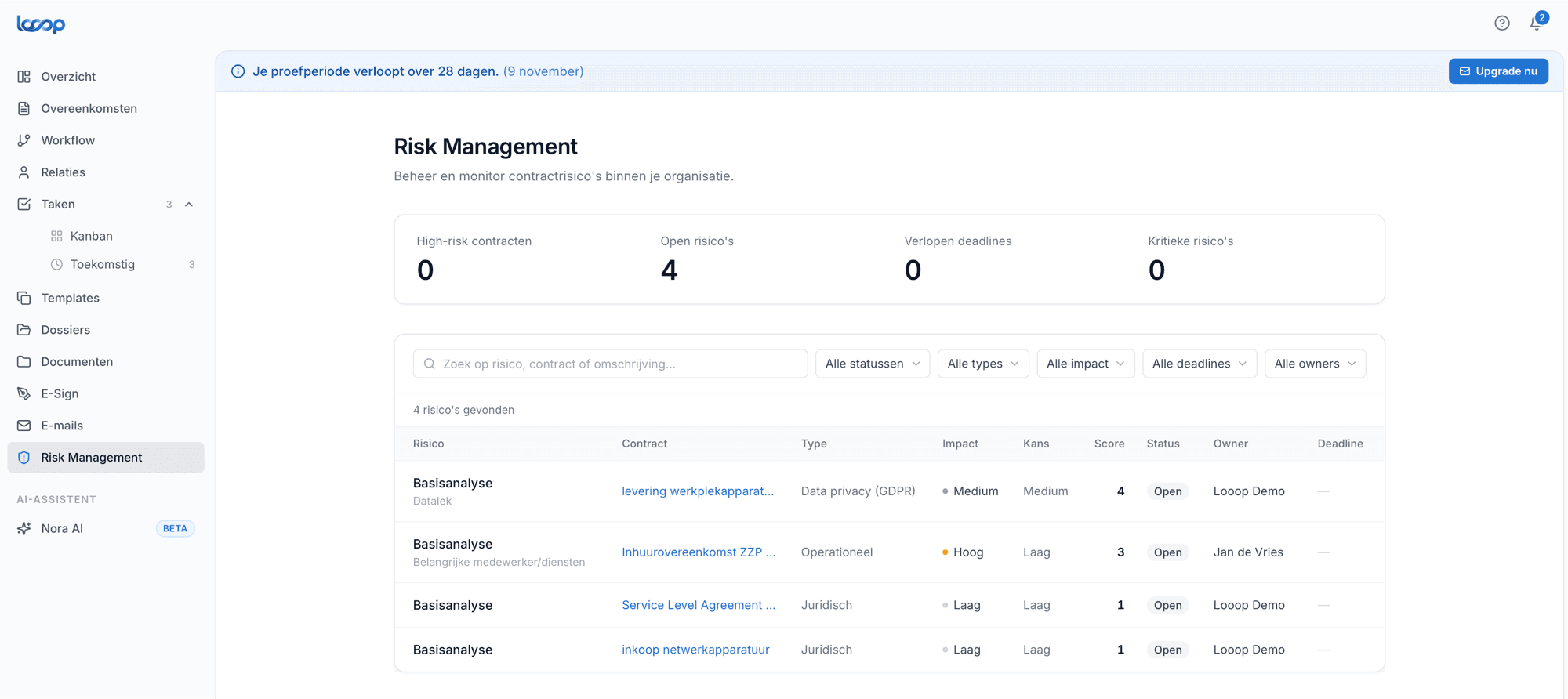
A risk never stands alone. From the contract you see which risks apply, and from the risk you see which agreement it belongs to.
Impact times likelihood gives a score
Set the impact and likelihood per risk. Looop turns that into a score, so you can sort the list by urgency instead of gut feeling.
One owner per risk
Every risk gets someone responsible. There is always someone on the hook, and nobody has to guess who should act.
Deadlines you do not forget
Put a deadline on a control and track whether it is met. Overdue deadlines move to the top of the list.
Automatically in your reporting
Risks count towards the contract overview and your reporting. There is no separate overview to maintain.
Filter by what matters now
Filter by status, type, impact, deadline or owner. From legal to operational and from GDPR to financial.
In practice
Sound familiar?
The risk register is a spreadsheet updated once a year, usually just before an audit. Whoever renews the contract never opens it, because it lives somewhere else. When something does go wrong, the risk often turns out to have been written down already, only nobody acted on it.
In Looop you record a risk on the contract itself, with impact, likelihood, owner and deadline. Whoever opens the contract sees what applies, and whoever opens the risk overview sees which agreement it concerns. It all flows into your reporting automatically.
How it works
Add a risk to the contract
Open an agreement, go to the risks tab and describe what could go wrong. Pick the type: legal, operational, financial or privacy.
Set impact, likelihood and owner
Decide how bad it is if it happens and how likely that is. Looop calculates the score. Assign someone and add a deadline if you need one.
Steer from the overview
The risk page shows everything together, sorted by score. Filter on what is open, take the heaviest risks first and close them once the control is in place.
Risks are in your reporting, not beside it
Because every risk hangs off a contract, there is nothing to gather when someone asks. During an audit, an acquisition or a conversation with your accountant, it is simply there.
- See at a glance how many high-risk contracts there are
- Track open risks and overdue deadlines per owner
- Export the overview as evidence for your audit file
Example: risk scores
Know what is coming, before it arrives
In a thirty-minute demo we show you how risk management works in Looop, using your own contracts as the example.