
You can't track the notice period of a contract you don't know exists. Yet almost every organisation starts contract management with the contracts that happen to be in view: the office lease, the big IT supplier, perhaps the car leases.
The rest stays where it is. And that is exactly where the surprises are: the software licence of a colleague who left, the data processing agreement that was never signed, the maintenance contract that has quietly renewed three times.
Short answer: run the inventory in five steps. 1) Look in five places: accounts, departments, drives, inboxes and the filing cabinet. 2) Gather everything in one place. 3) Record the same set of data for each contract. 4) Assign an owner to each contract and start with the largest and most critical. 5) Agree that no new contract is signed outside the register.
Step 1: look in five places
Contracts are rarely in one place. Together, these five sources cover almost everything:
1. The accounts. Run a list of every recurring payment from the past year. Each recurring payment belongs to an agreement, even if nobody calls it a contract. This is the most reliable source, because it starts from what you actually pay.
2. The departments. Send each department a short question: which parties do you have agreements with, and where are they? Give a two-week deadline and the list below as a prompt.
3. Shared drives and SharePoint. Search for terms like "agreement", "contract", "terms", "SLA" and "processing".
4. Inboxes. Many agreements were only confirmed by email: an order confirmation, acceptance of a quote, a renewal letter. Search the inboxes of procurement, finance and management.
5. The filing cabinet. Older contracts, especially leases, are often still on paper.
Which contracts get forgotten?
Use this list as a check. The bottom half in particular is almost always missed in a first inventory:
- Leases for office space and parking
- Leases for cars, printers and other equipment
- IT: software, SaaS subscriptions, hosting, phone and internet
- Facilities: cleaning, security, catering, maintenance
- Contractors, temps and freelancers
- Insurance
- Customer contracts and framework agreements with customers
- Data processing agreements (GDPR)
- Non-disclosure agreements (NDAs)
- Subscriptions paid by credit card
- Agreements only confirmed by email or quote
Step 2: gather everything in one place
Put everything you find in one folder first, before you start registering. Scan paper contracts. Give files a fixed name, for example counterparty - subject - start year.
For each contract, also find the general terms and conditions and any amendments and renewal letters. That is often where the notice period sits that the contract itself doesn't mention.
Found a contract without a signed copy? Ask the counterparty for a copy of the current contract and the terms. Record that it was missing, and if in doubt assume the longest reasonable notice period.
Step 3: record the same data for each contract
Stick to a fixed, limited set of fields. Ten fields that are always filled in beat thirty that stay half empty:
- contract name, counterparty and contract type
- owner
- start and end date, and whether the contract auto-renews
- notice period and the notice deadline
- annual value
- the document itself, or where it is kept
This is the most time-consuming part when done by hand: open the PDF, find the terms, retype them. Expect ten to fifteen minutes per contract, more if the notice period is in the terms and conditions.
Want to start in Excel? Download our free contract register template. It works out the notice deadline for you.
Step 4: assign owners and prioritise
A contract without an owner isn't monitored. Assign one person per contract who decides on renewal or termination, usually the budget holder, and have them confirm it.
Then work from big to small:
- First the contracts with a notice deadline within 90 days. You can still act on those.
- Then the twenty largest, by annual value.
- Then the critical contracts: the ones your operations depend on, or where personal data is processed.
- Then the rest, at your own pace.
What you find in the critical contracts can go straight into a risk matrix. See mapping contract risk.
Step 5: stop it going out of date
The biggest pitfall of an inventory: a year later, the register is out of date again. Three agreements prevent that:
- No new contract without registration. Whoever signs makes sure the contract is in the register, with an owner.
- A fixed monthly moment to go through the upcoming notice deadlines.
- Once a year, compare the accounts with the register. Is there a recurring payment without a contract? Then something was missed.
Faster with AI and bulk import
The retyping in step 3 is exactly the work software can take off your hands.
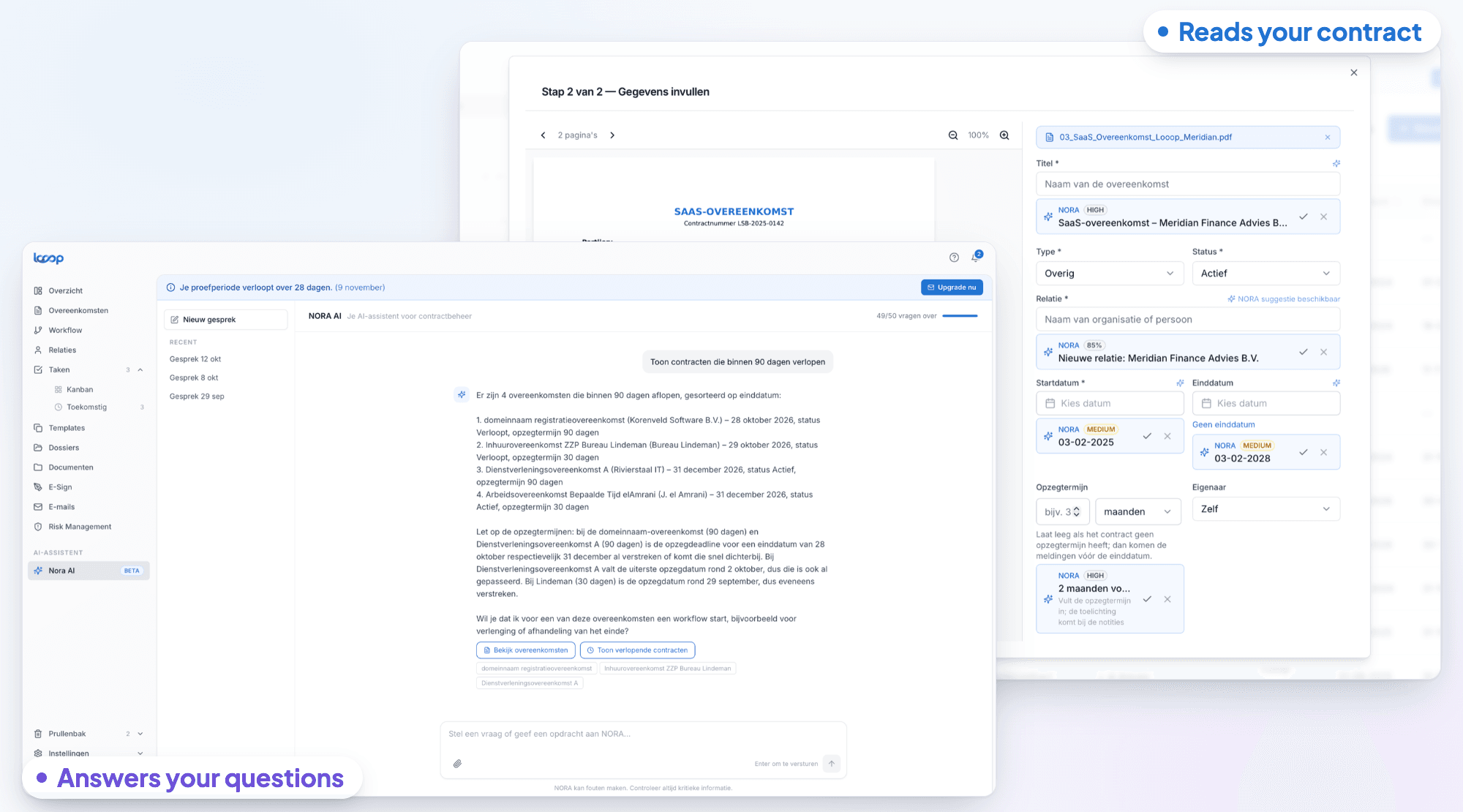
In Looop you upload a contract and NORA AI reads it: the counterparty, start date, end date and notice period are suggested, each with the passage from the contract it is based on. You check and confirm. NORA recognises your own organisation and doesn't suggest it as the counterparty; when in doubt you get several candidates rather than a guess.
Already have a list? With bulk import you move an Excel or CSV file of contract data across in one go, together with the documents themselves as separate files or a zip. Looop provides a sample template for it, and shows before importing which rows are ready and where something is still missing.
After that, Looop monitors it for you: expiry alerts 90, 60, 30 and 7 days before the notice deadline, to the owner, and with the email integration renewal letters and order confirmations end up with the right contract instead of in someone's inbox.
Want to know what such an inventory delivers? Work it out with the ROI of contract management software in four steps.
Frequently asked questions
- How do you start a contract inventory?
- Start with your accounts: every recurring payment belongs to a contract. Also ask every department which agreements they have, and search shared drives and inboxes. Gather everything in one place before you start registering.
- How long does a contract inventory take?
- For an organisation with a few hundred employees, gathering usually takes two to four weeks, mostly waiting for departments. Registering goes quickly when AI extracts the data from the documents; retyping by hand easily takes ten to fifteen minutes per contract.
- Which contracts are most often forgotten?
- SaaS subscriptions paid by credit card, data processing agreements, NDAs, lease contracts, maintenance contracts and agreements only confirmed by email.
- What do you do with contracts where the signed copy is missing?
- Ask the counterparty for a copy of the current contract and terms, and record that the copy was missing. If the notice period is unclear, assume the longest reasonable period, so a termination is always on time.